Updated: December 12th, 2025
Overview
Cosmos is a comprehensive dataset that compiles records voluntarily contributed by health systems using Epic for electronic medical record (EMR) management. More than just a data repository, Cosmos provides a complete data warehouse and analytical infrastructure, including tools such as SlicerDicer and the Data Science Virtual Machine (DSVM), designed to facilitate scientific discoveries and advance medicine 1,2.
The network currently encompasses nearly 2,000 hospitals across the country and globally, with almost half a million physicians caring for approximately 300 million patients. This collaboration creates a dataset containing billions of high-quality, representative, longitudinal clinical data points 3. Notably, the patient demographics represented in Cosmos closely align with those of the United States Census, enhancing its research utility 4. All participating organizations and members of the Cosmos Governing Council can be viewed on the Cosmos Community page 3.
Epic Cosmos combines inpatient and outpatient charts into unified, longitudinal patient records while removing duplicates that may arise from patients receiving care at multiple Cosmos organizations. The data provided to researchers adheres to HIPAA-defined limited data set standards 4. To enhance patient privacy protections, the de-identified dataset suppresses geographic information, consistently shifts patient dates, and conceals source organizations. Detailed information on individual data element transformation processes is available in the Cosmos Data Domain Encyclopedia and the Data Dictionary (also accessible through the Cosmos portal) 5,6.
The Cosmos Overview page provides an invaluable introduction to Epic’s resource, outlining essential information for both non-sponsored and third-party sponsored research projects 4. This includes guidance on Cosmos data usage, project tracking procedures, and publication expectations, with additional details available in the corresponding data access level sections on this webpage.
The types of data collected in the EMR are continuously expanding. For example, researchers currently have access to the following data 4:
Patient Information: Limited demographic details such as age, sex, gender identity, race, ethnicity, location, patient status, and family history, social history elements like tobacco and substance use, birth control, social determinants of health, allergy information, and detailed birth history.
Visits and Encounters: Patient encounters and admissions including encounter type, classification, department and provider specialties, and visit reasons, as well as clinical notes from various medical documentation and patient experience data from MyChart usage and patient-reported outcomes.
Medical Data: Diagnoses, clinical and billed procedures, and vital signs such as blood pressure, pulse, temperature, respiratory rate, SpO2 levels, height, weight, BMI, and head circumference.
Lab and Genomics: Lab results such as component-specific results, susceptibility results, and reference ranges, in addition to genomic variant data like allelic state and chromosome details, and biosamples for genomic assays including blood, saliva, and urine samples.
Health Assessments: Information on cancer staging, immunizations, and eye exams, with details on stage group, immunization type, and visual acuity.
Specialty Data: Records data on hospital-acquired infections and various infection types, surgical procedures, transplant data for liver and kidney transplants, and health tracking data from wearable devices.
Research and Analytics: Geographic factors like RUCA and Social Vulnerability Index, risk scores for conditions such as cardiovascular disease and diabetes, and data from research studies detailing study type, enrollment, and partnered research contributions.
Miscellaneous: Encompasses peer group information on various types of hospitals, medication data including prescriptions and patient-reported medications, and additional lab results.
Gaining Access
Do I Qualify?
Basic access provides users with entry to the Cosmos data portal, allowing them to query the limited dataset using SlicerDicer, create dashboards with custom elements, and share dashboards with other Cosmos users 7.
While Yale University-Yale New Haven Hospital System (YU-YNHHS) manages access to YNHHS Epic data through Research Basic Access (RBA), Epic coordinates with YU-YNHHS to manage researcher access to Epic Cosmos data. According to their rules, any researcher seeking access to Epic Cosmos must already have RBA to the YNHHS Epic data. Full instructions for obtaining RBA are available on our Yale New Haven Health System (YNHHS) Epic information webpage 8.
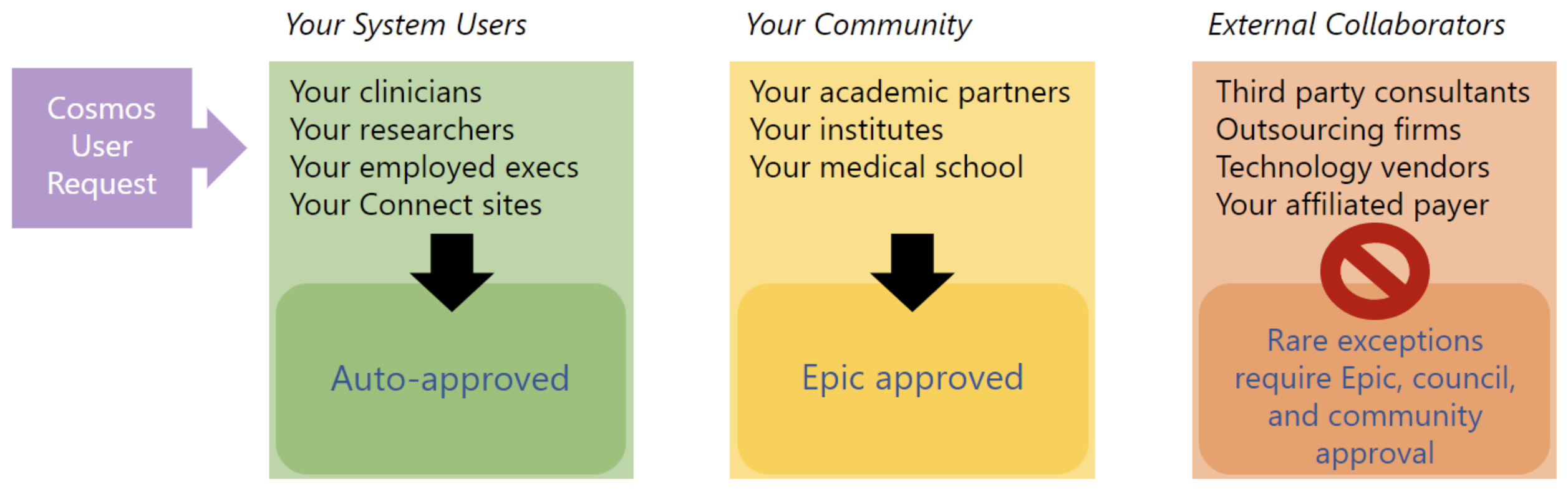
Researchers in the “Your Community” category (directly affiliated partners) may require additional review by the Cosmos Governing Council to gain access to Epic Cosmos. External Collaborators (e.g., pharma employees, contractors, etc.) are typically not intended to have access to Epic Cosmos, but special approval requests can be submitted to the Cosmos Governing Council. These qualification tiers are illustrated in Epic’s infographic below 8.
Typical Timeline
CITI training completion typically takes 1-2 weeks, as the training is comprehensive and involved. Once completed, certificates take no more than 2 business days to be reflected in Workday. Note that recognition timing may vary if training is completed outside of Workday 9.
Step-by-Step Guide
This page assumes researchers have RBA. Follow the YNHHS Epic webpage instructions to obtain RBA if needed.
a: Complete Yale’s HIPAA Training
For Yale NetID holders: Complete the HIPAA Privacy and Security courses in Workday, including the basic privacy and security module, followed by the role-specific module (e.g., for clinicians or researchers) 10.
For Non-Yale NetID holders: Read and sign the HIPAA Privacy and Security training materials specific to your role on the project (e.g., for clinicians or researchers). Submission directions for these documents can be found on the accompanying PDF 10.
b: Obtain a Human Subjects Protection Training (HSPT) Certificate from CITI
A Human Subjects Protection Training (HSPT) certificate from CITI completed within the last three years is required. Below is a summary of the process, and the complete directions can be found on the It’s Your Yale page about HSPT 9.
Researchers need to complete the following CITI certificates:
- “Basic Training”
- One of the following two initial/basic Human Subjects Research modules: “Biomedical Research Basic” or “Social Behavioral Educational Researchers Basic”.
If CITI certification was completed at another institution, a copy should be emailed to irb.training@yale.edu before proceeding to Section C. For further inquiries, the same email address can be used.
If you have not yet received an HSPT certificate or if your certificate is more than three years old, you will need to complete the training in CITI. First, access CITI or link your CITI account with your Yale Workday account.
b.i: Accessing CITI and Linking It
For Yale Employees: It is preferable, though not required, to access the CITI training modules through Workday. This will expedite the recognition of the certificate in the Yale Integrated Research Enterprise Solution (IRES) IRB system.
Open the Learning Homepage in Workday.
The CITI training link will appear as the “Human Subjects Protection Training – Initial/Refresher” course under the “Required Training” section. If it does not appear, ensure that your name is listed in the IRES IRB pending study or submission. If it still does not appear, contact your manager or reach out to learning@yale.edu or irb.training@yale.edu to request a manual assignment.
If available, complete the “Compliance Assessment” to indicate that you are conducting human subjects research.
Once the “Human Subjects Protection Training – Initial/Refresher” course page is accessed, the “Enroll” button should be clicked to proceed.
A button labeled “Start Program”, or “Retake Program” if being taken as a refresher, will appear under the course photo. Click it to proceed.
Log into CITI using the “Yale University Training Opportunities” Single Sign-On (SSO).
For Non-Yale Employees: Non-Yale employees should access CITI through their own institution or directly via the main webpage. Pursuing certification independently may incur charges. Current costs for CITI courses can be found on the Explore Our Courses webpage 11.
b.ii: Register for the Certification
Once access to CITI courses is granted, follow these steps to complete the certification:
In CITI, select “Add a Course” and scroll to the bottom to find the initial/basic CITI HSP Training under the Human Subjects Research heading.
Indicate the intent to take a Human Subjects Research course and select either “Biomedical Research” or “Social Behavioral Educational Researchers.” When prompted, confirm the selection of the “Biomedical Research-Basic Course.”
Complete the course modules and achieve a passing grade of at least 70% on the assessment.
If the Workday account was not linked with CITI, save the completion certificate and send it to irb.training@yale.edu. If accessed through Workday, the record should auto-update.
c: Mastering SlicerDicer in the Cosmos Environment
Individuals are expected to have completed the YNHHS Epic RBA application process, including all mandatory training for that level of access. YNHH and Joint Data Analytics Team (JDAT) provide training specifically tailored for the YNHHS Epic portal within the YNHH Virtual Desktop Infrastructure (VDI), which differs from the training provided by Epic for similar analytic tools available in the Cosmos data portal, such as SlicerDicer 7,12.
Applicants may be required to demonstrate their proficiency with SlicerDicer upon request.
To help users get acclimated to these differences, the following resources are recommended by Epic:
“Cosmos Portal & Analytics Resources” - available on Galaxy 13
Here’s How… SlicerDicer [POSS043] - available on weLearning 14
Archived Past Slice of the Month Sessions showcasing researchers using Cosmos in various ways for their own research projects 15.
d: Submit Access Application
The preceding steps help applicants prepare for filling out the Cosmos Basic Access Request form 16. Once these steps have been completed, fill out the YNHH Cosmos Basic Access Request form, following applicable guidelines, to initiate the approval process 2.
e: Training
Complete training requirements, role descriptions, and expectations can be found in the Cosmos Training and Support section of the Cosmos Setup and Support Guide, with key points summarized below 7,12. Optional training modules for Data Science and Data Architecture certifications are also available through the same section.
e.i: Required Training
User Agreement - available on Galaxy 17
“Explore SlicerDicer” - available on Cosmos. From the main Cosmos landing page, hover over the “Explore” tab in the top bar to display the drop-down menu, and select “Explore SlicerDicer” under the “Explore” section 18.
e.ii: Recommended Training
Responsible Use Document and Assessment - available on Galaxy 19
Cosmos Learning Home - available on Cosmos 20
Cosmos eLearning Videos - available on weLearning 21
“Cosmos Publication Checklist” - available on Galaxy with summarized notes below 22
Select materials from the Cosmos Super User Badge training - available on Epic University 23. Under the “Super User in the Portal” section, access:
- Self-Study materials
- Project
- Select materials from the Cosmos Researcher User Badge training - available on Epic University 24. Under the “Data Literacy for Cosmos Researcher” section access the “Self-Study” materials.
Accessing Epic Cosmos
Access to the Epic Cosmos SlicerDicer is through the Epic Cosmos portal, not the YNHH VDI. You can open this portal from the Epic UserWeb by navigating to the “Show All” drop-down menu and selecting “Cosmos” under the “Support” section.
If you encounter any issues logging into Cosmos, please contact JDAT for assistance. If the issue persists, reach out to CosmosUserRequests@Epic.com.
Initiating Collaborative Projects
Researchers with Cosmos Basic Access can share code and datasets with peers who are collaborators on specific research questions 25. These collaboration networks are created using the Cosmos Projects tool. Directions on how to create and maintain projects can be found in the “Cosmos Tip Sheet: Create and Monitor Projects” 26.
Certified Cosmos Data Science users can share code with the entire Cosmos community via Cosmos’s GitLab. For more details, please refer to the Data Science certificate tab below.
Publications Expectations
Epic provides data users with a checklist for preparing data for publications, emphasized in the user agreement, “Cosmos Rules of the Road”. The full instructions and expectations can be found in the Galaxy “Cosmos Publication Checklist” article and the “Cosmos Rules of the Road”, which outlines some of the Data Use Agreement terms 22,27.
When transferring results off the VDI or sharing SlicerDicer graphs, it is imperative to follow Epic’s process to prevent the exportation of line-level data. No counts less than 10 can be individually noted (report as <11).
Review the Centers for Medicare and Medicaid Services (CMS) Cell Size Suppression Policy outlined by the Research Data Assistance Center (ResDAC) for examples of how to appropriately suppress low counts 28.
Researchers are obligated to provide a list of citations for any publications or references to their research conducted using Cosmos. This list must be submitted to the Governing Council on a semi-annual basis 27.
Additional Certifications
Individuals have the opportunity to obtain additional certifications beyond a Cosmos Basic Access account, granting them extra permissions and capabilities with Epic data 7. For YNHHS employees, obtaining Super User certification is mandatory, and it is highly encouraged for all YU employees 29.
As previously noted, detailed training requirements, role descriptions, and expectations can be found in the Cosmos Setup and Support Guide under the Cosmos Training and Support section. Relevant details are summarized below for each certification track.
Do I Qualify?
Epic expects one Super User for every 10 standard Cosmos Users, with each Super User spending at least an hour each week engaging with Cosmos by performing tasks such as 7:
- Building experience with the Cosmos portal tools and processes.
- Attending Cosmos meetings for collaboration and questions.
- Sending feedback or significant questions to Epic.
- Assisting colleagues with using Cosmos tools, including SlicerDicer queries and peer reviews.
Anyone with Cosmos Basic Access is eligible to request the training be assigned to their account.
Typical Timeline
Step-by-Step Guide
Email registrations@epic.com to request the Cosmos Super User training be added to one’s profile.
Once approved by the Epic team, applicants will receive a welcome email to the Cosmos resource.
Complete all the Cosmos Super User Badge training modules on Epic University 23.
Watch the Cosmos eLearning Videos, available on weLearning 21.
In addition, Epic recommends the following supplementary trainings:
Select materials from the Cosmos Researcher User Badge training available on Epic University 24. Under the “Data Literacy for Cosmos Researcher” section, access the “Self-Study” materials.
Review the “Cosmos Publication Checklist” available on Galaxy 22.
- Optional training is also available; for a complete list, refer to the Cosmos Training and Support section 12.
Do I Qualify?
Obtaining the Researcher certification is recommended for those who plan to publish or extensively share their findings using Cosmos data 7. Anyone with Cosmos Basic Access can request the assignment of this training to their account.
Typical Timeline
Step-by-Step Guide
Attain Cosmos Super User status, as described in the previous tab.
Email registrations@epic.com to request the Cosmos Researcher User training be added to one’s profile.
Once approved by the Epic team, applicants will receive a welcome email to the Cosmos resource.
Complete all the Cosmos Researcher User Badge training modules on Epic University 24.
Review the “Cosmos Publication Checklist” available on Galaxy 22.
Optional training is also available; for a complete list, refer to the Cosmos Training and Support section 12.
Do I Qualify?
A Data Scientist is responsible for importing datasets prepared by a Data Architect into any Cosmos-supported data science tool, such as Python or R, to perform analyses and address research questions 7.
Individuals with Cosmos Basic Access are eligible to request the training be assigned to their account, but note that prior experience with data science tools available in Cosmos, such as Python and R, is assumed. This training can be pursued either in addition to the Data Architect track, or as an alternative to it.
Typical Timeline
Step-by-Step Guide
Attain Researcher status, as described in the previous tab.
Complete the “Class Prerequisites” and “Cosmos Responsible Use” sections in the Cosmos for Data Scientists training track on Epic University 30.
Fill out the YNHH Cosmos Data Science & Data Architect Training Request form, following applicable guidelines, to initiate the approval process 31.
Applicants may be required to demonstrate their proficiency with SlicerDicer upon request.
Funding for Epic-led Cosmos courses must be provided by the individual or their sponsor. A Charge of Accounts (COA) number will be required in the form application for the Research Informatics Office (RIO) Finance team.
Email Dr. Jonathan Quang (jonathan.quang@yale.edu; jonathan.quang@lmhosp.org) or Dr. Daniella Meeker (daniella.meeker@yale.edu) to request approval for the Cosmos for Data Scientists training.
Once approval is received from either Dr. Quang or Dr. Meeker, email registrations@epic.com to request the Cosmos for Data Scientists training be added to the profile.
Complete all the remaining Cosmos for Data Scientists training modules on Epic University 30.
In addition, Epic recommends the following supplementary trainings 12:
The SQL II self-study materials, “RPT121i SQL II,” are available on Galaxy 32.
The “Cosmos Data Science White Paper Library,” a collection of articles covering data science best practices, is available on Galaxy 33.
- Optional training is also available; for a complete list, refer to the Cosmos Training and Support section 7.
Initiating Collaborative Projects
With Cosmos Basic Access, researchers can share code and datasets with collaborators assigned to relevant Cosmos Projects 25. Instructions for establishing a Cosmos Project are detailed above under the Cosmos Basic Access tab.
Certified Cosmos Data Science users can share code with the entire Cosmos community via Cosmos’s GitLab. Directions on how to create and maintain projects can be found in the “Cosmos Tip Sheet: Navigate the Cosmos GitLab” 34. Additional rules and expectations regarding sharing research work with Cosmos users, as well as other engagement opportunities available to Data Science users, can be found in the “Collaborating in Cosmos” article 25.
Included Tools and Applications
Certified Data Science users gain access to a dedicated Data Science Virtual Machine (DSVM) which features 2,35:
- Hardware: 2.7GHz, eight-core CPU with 32GB RAM
- Database access: Direct SQL query capabilities
- Storage: Networked file sharing among project members
The DSVM includes preloaded analytical tools such as RStudio and R, Jupyter notebooks with a Python kernel, and SQL Server Management Studio. Storage allocation provides 20GB of folder space and a 20GB SQL database for both project-level and individual user resources. For detailed information on available software, see the Available Data Science Packages article, which describes all packages included in the DSVM 36.
Do I Qualify?
A Data Architect is expected to be knowledgeable about the Cosmos data model, write SQL queries against the de-identified database, and build data marts that extract data relevant to research projects. These extracts are then made available to researchers with Data Scientist credentials to perform analyses using Cosmos-supported data science tools to address research questions 7.
Anyone with Cosmos Basic Access is eligible to request the training be assigned to their account. This training can be pursued either in addition to the Data Science track, or as an alternative to it.
Typical Timeline
Step-by-Step Guide
Attain Researcher status, as described in the previous tab.
Complete the “Class Prerequisites” and “Cosmos Responsible Use” sections in the Cosmos Data Model for Data Architects training track on Epic University 37.
Fill out the YNHH Cosmos Data Science & Data Architect Training Request form, following applicable guidelines, to initiate the approval process 31.
Applicants may be required to demonstrate their proficiency with SlicerDicer upon request.
Funding for Epic-led Cosmos courses must be provided by the individual or their sponsor. A Charge of Accounts (COA) number will be required in the form application for the Research Informatics Office (RIO) Finance team.
Email Dr. Jonathan Quang (jonathan.quang@yale.edu; jonathan.quang@lmhosp.org) or Dr. Daniella Meeker (daniella.meeker@yale.edu) to request approval for the Cosmos for Data Scientists training.
Once approval is received from either Dr. Quang or Dr. Meeker, email registrations@epic.com to request the Cosmos for Data Scientists training be added to the profile.
Complete all the remaining Cosmos Data Model for Data Architects training modules on Epic University 37.
In addition, Epic recommends the following supplementary trainings:
- The “Cosmos Data Science White Paper Library,” a collection of articles covering data science best practices, is available on Galaxy 33.
- Optional training is also available; for a complete list, refer to the Cosmos Training and Support section 7.
Included Tools and Applications
Certified Data Science users gain access to a dedicated DSVM, as described in the previous tab. It includes preloaded analytical tools, such as SQL Server Management Studio, from which Data Architects can query the de-identified Cosmos dataset 35.
Relevant Links
Epic UserWeb: Find Epic training materials, documentation, community discussions, support resources, updates, customization options, and access to your Epic profile 38.
Epic University: A subdomain of the UserWeb, find training opportunities and access to coursework necessary to obtain certificates, such as the Super User Badge, with courses organized by the Epic team 39. Learn more about advanced training options on our Epic Cosmos information webpage.
Galaxy: A subdomain of the UserWeb, find comprehensive resource that provides documentation, announcements, best practices, and implementation guides related to the Epic dataset 40.
“Staying in the Loop and Providing Cosmos Feedback”: Find meetings and other opportunities to engage with and provide feedback to the Cosmos support, training, and administration teams. The table also outlines the typical level of access participants have, such as Super User 41.
“Guidance for Conducting Externally Funded Research Using Cosmos”: Find expectations and guidelines for conducting externally funded research using Epic Cosmos data 42.
Publications
This section presents a selection of PubMed articles that utilize the dataset and are authored by individuals affiliated with the Yale University. These articles are provided to inspire researchers and students to use the data in their own work.
-
Semaglutide and Tirzepatide Prescribing for Obesity in Patients With Preexisting Comorbid Cancers.
Chungsoo Kim, Michaela A Dinan, Timothy J Robinson, Joseph S Ross, Ania M Jastreboff, Harlan M Krumholz, Yuan Lu
JAMA oncology 2025 Nov 6 doi: 10.1001/jamaoncol.2025.4560
PMID: 41196576 -
Racial, ethnic, and sex disparities in buprenorphine treatment from emergency departments by discharge diagnosis.
Neeraj Chhabra, Dale Smith, Natalie Parde, Nicole Hsing-Smith, Joseph M Bianco, R Andrew Taylor, Gail D’Onofrio, Niranjan S Karnik
Academic emergency medicine : official journal of the Society for Academic Emergency Medicine 2025 Apr 25 doi: 10.1111/acem.70035
PMID: 40277252 -
Uptake of and Disparities in Semaglutide and Tirzepatide Prescribing for Obesity in the US.
Chungsoo Kim, Joseph S Ross, Ania M Jastreboff, Daniella Meeker, Harry Freedman, Harlan M Krumholz, Yuan Lu
JAMA doi: 10.1001/jama.2025.4735
PMID: 40299371